Grooming scheduling software
One column per groomer
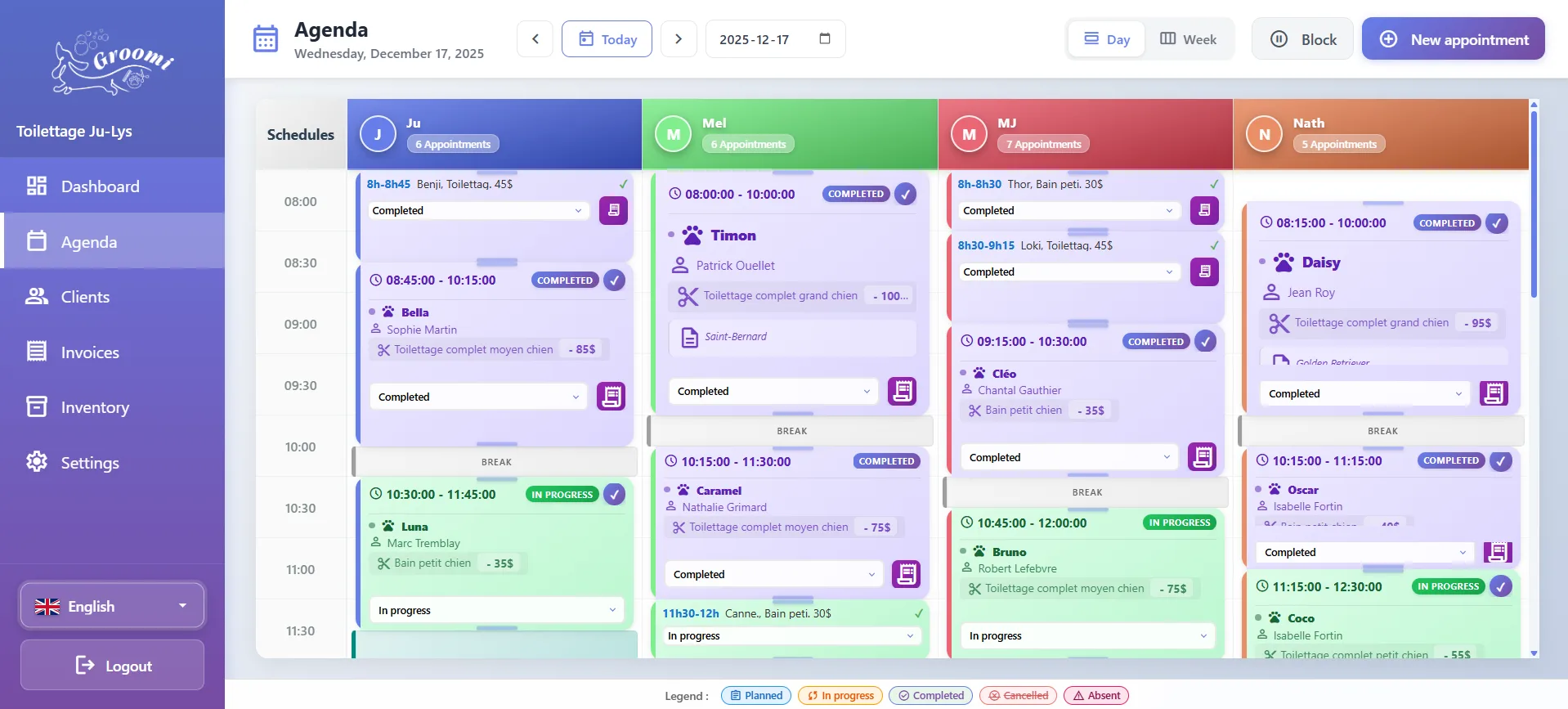
In day view, each groomer has a column, in their colour, with the number of appointments for the day. Week view shows the days side by side.
- Drag an appointment to change the time, day or groomer; stretch it to change its length.
- Each appointment shows the pet, client, service and price.
- Statuses: booked, in progress, finished, cancelled, no-show.
Working hours, breaks and blocks
Set each groomer’s working hours, day by day. Add breaks that repeat every week, for the whole salon or for one groomer. For a one-off absence, add a dated block: break, lunch, unavailable or time off. Blocks move and stretch like appointments.
Online booking respects these hours, breaks and blocks: a client cannot request a slot when the groomer is not available.
Multi-pet and recurring appointments
A client comes with two dogs? Create a group appointment: the pets are placed one after the other, and the client gets a single reminder naming them all.
Each pet can have a visit frequency (every 4, 5, 6, 7, 8, 10 or 12 weeks, or one you choose). When an appointment is finished, Groomi suggests the next one at the same time. You can also schedule a series, up to a date or a number of appointments; conflicting slots are skipped and listed with the reason.
A calendar that stays up to date on every screen
Changes show in real time on the other open screens: an appointment moved at the front desk appears right away on the grooming room tablet. An online booking request or a client confirmation arrives as a notification.
A deleted appointment is archived rather than erased. You can also give appointments your own colours and labels.
Questions about the calendar
How many groomers can I add?
As many as you have. The price stays $49.99 a month. Groomers are calendar columns: they do not get their own login.
Can I block a day off?
Yes. Add a time-off or unavailable block, for the whole salon or a single groomer. Online booking takes it into account.
Does Groomi prevent double bookings?
Online booking only offers free slots. In the calendar, series scheduling skips and lists conflicts; an appointment added by the salon stays under your control.
Is the client notified when I create an appointment?
If you turn it on, a confirmation text goes out when the appointment is created, with a different template for a group appointment or a series.
Can I check the calendar on my phone?
Yes, in the phone or tablet browser. There is nothing to install.
Set up your calendar in an hour
Try Groomi for 14 days: add your groomers, their hours and your first appointments.
Start the trial